Ideas Journal KDP Interior: Streamlining Low-Content Publishing Workflows
For self-publishers and digital product creators, the bottleneck is rarely the concept; it is almost always the execution. The Ideas Journal KDP Interior serves as a foundational asset designed to bridge the gap between initial brainstorming and final publication. Rather than spending hours formatting margins, calculating bleed settings, or designing repetitive layouts, publishers can utilize this pre-formatted interior to accelerate production timelines while maintaining professional quality standards. This resource is specifically engineered for Amazon Kindle Direct Publishing (KDP) but remains versatile enough for other print-on-demand platforms or direct digital sales.
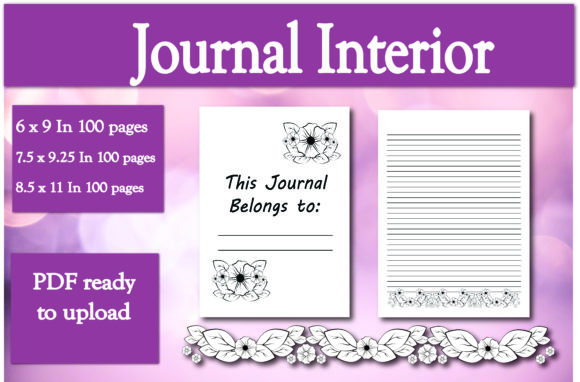
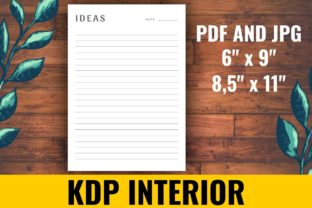
The core value of this interior lies in its immediate usability and technical compliance. Available in both PDF and JPG formats, it accommodates different software preferences and workflow requirements. Whether you are using Adobe InDesign for precise layout adjustments, Canva for quick cover integration, or Photoshop for image manipulation, having source files in multiple formats ensures compatibility. The inclusion of two standard trim sizes—6x9 inches and 8.5x11 inches—covers the most commercially viable dimensions for journals, notebooks, and planners without requiring custom size calculations.
Technical Specifications and Format Utility
Understanding the technical delivery of the Ideas Journal KDP Interior is essential for efficient implementation. The package includes 100 pages, which is a strategic length for low-content books. It hits the sweet spot for perceived value versus printing costs on KDP, ensuring healthy royalty margins while providing ample space for end-users. The availability of distinct file types addresses specific pain points in the publishing process.
- PDF Format: This is the industry standard for KDP uploads. The PDF files included are typically flattened or outlined to prevent font substitution errors during the upload review process. They preserve exact margin guides, gutter safety zones, and bleed areas. For publishers who want a "upload-ready" solution, the PDF allows for direct submission after adding a custom title page or branding elements.
- JPG Format: High-resolution JPGs offer flexibility for creators who prefer working in raster-based environments or need to treat pages as individual assets. This format is particularly useful for creating mockups, marketing materials, or digital versions of the journal for platforms like Etsy or Gumroad. It also allows users to import single pages into design software without managing a multi-page document structure.
The dual size options further streamline decision-making. The 6x9 inch version is the quintessential portable journal size, ideal for daily carry, travel logging, and pocket-sized ideation. Conversely, the 8.5x11 inch version caters to users who require more horizontal space for sketching, detailed project planning, or educational worksheets. By securing both sizes, publishers can create bundled offerings or A/B test market preferences without redesigning the interior from scratch.
Integration into Pre-Publication Workflows
The most effective use of the Ideas Journal KDP Interior occurs before the design phase begins. Many new publishers waste significant time researching KDP’s changing margin requirements and safe zones. By adopting a pre-validated interior, you eliminate the risk of rejection due to technical formatting errors. This shifts the workflow focus from troubleshooting to creative differentiation.
During the preparation phase, treat the interior as a base layer rather than a finished product. Successful low-content books often share similar interiors but distinguish themselves through niche-specific front matter. Use the provided template to insert a customized "How to Use This Journal" section, a copyright page with your specific ISBN, or a branded introduction. Because the 100-page count is fixed, any additions should be balanced by removing generic pages or accepted as an increase in total page count, which may affect printing costs. Planning these modifications upfront prevents reformatting later.
Keyword research should also inform how you utilize the interior. If your target audience searches for "structured brainstorming notebook," ensure the interior’s layout supports that intent. While the base template provides the structure, your metadata and cover design must align with the actual user experience inside the book. The interior acts as the fulfillment mechanism for the promise made in your listing description.
Workflow Compatibility and Tool Integration
This interior asset is designed to interact seamlessly with common publishing tools. For Canva users, the PDF can be uploaded directly to the "Uploads" tab and dragged onto the canvas as a background element. This preserves the original resolution and dimensions. Alternatively, individual JPG pages can be used to create carousel posts for social media marketing, showcasing the internal layout to potential buyers before they purchase.
For Adobe Creative Cloud users, the PDF serves as a master file. You can place the interior pages into an InDesign document to add variable data, such as sequential numbering or dynamic headers, which might be difficult to edit in the static source file. Photoshop users can leverage the JPGs to apply texture overlays, adjust contrast for better print reproduction, or composite the pages into lifestyle mockups for advertising campaigns.
Compatibility extends beyond software to business systems. Publishers managing multiple SKUs can use the standardized 100-page count to simplify inventory tracking and royalty forecasting. Since the page count remains constant across projects utilizing this interior, financial modeling becomes more predictable. This consistency aids in scaling operations, allowing creators to focus on niche research and cover design rather than recalculating production metrics for every new release.
Practical Implementation Strategies
To maximize the return on investment for the Ideas Journal KDP Interior, consider adopting a modular approach to product creation. Instead of viewing the journal as a standalone item, integrate it into broader content ecosystems. For educators, the 8.5x11 version can serve as a student reflection log accompanying a curriculum. For entrepreneurs, the 6x9 version can be positioned as a meeting companion or sprint planning tool.
Quality control remains paramount even when using pre-made assets. Always order a physical proof copy before launching. Screen resolution differs significantly from ink-on-paper output. Verify that the grey tones in the interior print clearly and do not appear muddy or too faint. Check the gutter margins physically to ensure writing space is comfortable near the binding. While the template is designed to KDP specifications, printer calibration varies, and personal verification ensures customer satisfaction.
Efficiency gains are realized through batching. Since the interior is consistent, you can design covers in bulk. Create a master cover template where only the title, subtitle, and author name change. Pair this with the ready-to-go interior to reduce the per-unit production time significantly. This batching method is particularly effective for seasonal releases or series expansions where speed-to-market is critical.
Adapting for Diverse User Needs
The versatility of the Ideas Journal KDP Interior allows it to serve various demographics within the 20–50 age range. For freelancers and gig workers, the structured format supports invoice tracking or client note-taking. For creatives, it offers a distraction-free zone away from digital devices. When marketing the journal, highlight these specific use cases rather than generic features. Explain how the 100-page limit encourages focused sprints of work or finite projects, turning a constraint into a productivity feature.
Consider the post-purchase experience as well. Since the interior is static, provide value-adds through external resources. Include a QR code on the first or last page linking to a downloadable digital supplement, a community group, or a video tutorial on maximizing the journal’s utility. This transforms a simple paper product into a gateway for deeper engagement and potential backend sales. The interior becomes the anchor for a larger brand ecosystem rather than just a commodity.
Long-Term Asset Management and Scalability
Sustainable publishing requires assets that endure. The Ideas Journal KDP Interior is designed for longevity. Unlike trendy designs that expire quickly, functional layouts remain relevant regardless of aesthetic shifts. Store your source files in an organized digital asset management system with clear versioning. If KDP updates their margin guidelines in the future, you will know exactly which version of the file needs updating.
As your publishing portfolio grows, this interior can serve as a benchmark for quality and performance. Track sales data specifically for products using this template versus custom interiors. Analyze whether the 6x9 or 8.5x11 variant performs better in specific niches. Use these insights to refine future acquisitions or custom design briefs. Data-driven decisions based on actual market performance are far superior to guessing.
Finally, respect licensing and usage rights. Ensure you understand the terms associated with the interior purchase. Most commercial licenses allow for unlimited end-products but prohibit reselling the template itself. Adhering to these guidelines protects your business from legal issues and maintains platform standing. Proper attribution, if required, should be integrated into your copyright page workflow immediately to avoid oversight during rushed launches.
Integrating the Ideas Journal KDP Interior into your publishing routine is ultimately about reducing friction. By handling the technical heavy lifting of pagination and formatting, it frees up mental bandwidth for high-value activities like niche validation, keyword optimization, and audience building. Whether you are launching your first low-content book or scaling a catalog of hundreds, having reliable, pre-formatted foundations is a practical strategy for sustainable growth. The combination of flexible formats, standard sizes, and optimal page counts makes it a pragmatic choice for serious publishers looking to professionalize their output while maintaining efficient workflows.