KDP Interior - 6x9 Recipe Book: A Practical Guide to Customization and Compliance
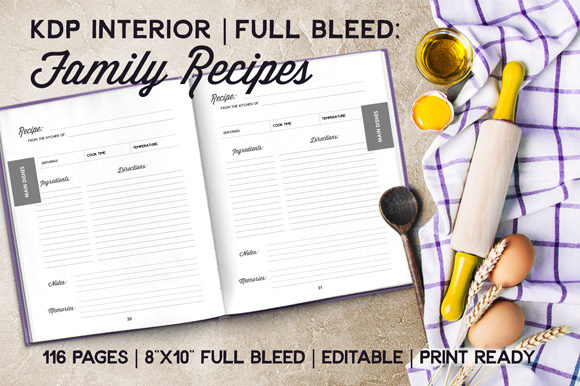
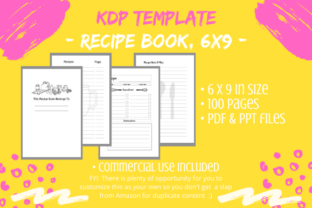
Creating a successful low-content book on Amazon KDP often comes down to the quality of the user experience inside the cover. The KDP Interior - 6x9 Recipe Book template is designed specifically for creators who want to offer a functional, organized space for home cooks and food enthusiasts. This specific interior format provides a structured layout that includes essential elements like a title page, copyright page, four empty Table of Contents pages, multiple recipe entry pages, and dedicated notes sections. With a standard 6 x 9 inch dimension and a no-bleed setup across 100 pages, it offers a professional foundation for self-publishers.
However, owning the template is only the first step. Many publishers download these assets with the intention of uploading them immediately, assuming that the file provided is ready for retail. This approach frequently leads to account warnings, poor customer reviews, or books that fail to sell because they look identical to dozens of other listings. To build a sustainable publishing business, you must treat this KDP Interior - 6x9 Recipe Book as a raw material rather than a finished product. Understanding how to properly manipulate, customize, and verify this digital asset is what separates profitable publishers from those who struggle with duplicate content issues.
The Critical Importance of File Management and Safety
Before you open PowerPoint or any PDF editor, there is a fundamental workflow mistake that beginners often make: editing the master file. When you receive your digital download containing both the PDF and PPT files, your immediate action should be to create a duplicate copy. Work exclusively on this copy while keeping the original pristine.
This might seem like basic computer hygiene, but in the context of KDP publishing, it is a vital safeguard. If you accidentally delete a master slide, corrupt the formatting, or save over your template with a specific niche design (e.g., "Grandma’s Cookie Recipes"), you lose the ability to use that base template for future projects. By maintaining an untouched master file, you ensure that you always have a clean starting point for your next culinary journal or family cookbook project. This simple habit saves hours of frustration and prevents the need to repurchase assets due to user error.
Leveraging the Editable PPT vs. Converting PDFs
The inclusion of an editable PPT file is a significant advantage that is often underutilized. Some creators attempt to convert the PDF back into an editable format using third-party tools because they are unaware of the included source file or prefer their own software. While converting a PDF to PPT is possible, it introduces unnecessary risks. Conversion software rarely preserves text boxes, margins, and alignment perfectly. You may end up spending more time fixing shifted elements and broken fonts than you would have spent simply customizing the native PPT file.
Stick to the provided editable source whenever possible. It ensures that the 6 x 9 no-bleed margins remain intact and that the typography stays consistent. Only resort to PDF conversion if you absolutely cannot work with PowerPoint and have verified that your alternative software respects KDP’s strict margin requirements.
Avoiding the Duplicate Content Trap
The most significant risk when using pre-made interiors is Amazon’s duplicate content policy. Amazon aims to provide value to customers, and listing fifty identical recipe books with different covers does not serve that goal. If you upload this KDP Interior - 6x9 Recipe Book exactly as received, you are highly likely to be flagged. Even if the book remains live, it will be buried in search results behind established competitors.
To avoid this, you must make the template uniquely yours. Customization goes beyond changing the font on the title page. Consider these practical modifications:
- Restructure the Layout: Move the notes pages to follow immediately after each recipe rather than grouping them at the back. This changes the pagination and user flow significantly.
- Add Value-Add Content: Insert measurement conversion charts, seasonal produce guides, or pantry staple checklists. These additions transform a generic notebook into a helpful reference tool.
- Incorporate Visual Elements: Add subtle borders, corner clip art, or watermark-style backgrounds. Ensure these elements respect the no-bleed safe zone to prevent printing errors.
- Rename Sections: Change standard headers like "Notes" to something more engaging like "Kitchen Experiments," "Taste Test Results," or "Family Feedback."
These changes signal to Amazon’s algorithms—and more importantly, to human buyers—that your book offers a distinct experience. The goal is to use the template’s structure while replacing its generic identity with your unique brand voice.
Verifying Dimensions and Bleed Settings
This specific interior is formatted for no bleed at 6 x 9 inches. A common misunderstanding involves the difference between bleed and no-bleed files. If you decide to add decorative elements that extend to the edge of the page during your customization process, you can no longer use this specific file as-is. You would need to resize the document to accommodate bleed (typically adding 0.125 inches to the top, bottom, and outside edges) and adjust all internal margins accordingly.
Attempting to force a no-bleed template into a bleed project without proper adjustment results in white borders appearing where color should be, or worse, critical text getting trimmed off during printing. Always verify your final PDF dimensions against KDP’s current specifications before uploading. If you stay within the no-bleed parameters, ensure all text and graphics remain at least 0.25 inches from the trim line to guarantee a professional print result.
Evaluating Usability Before Publishing
Technical compliance is mandatory, but market success depends on usability. Before finalizing your KDP Interior - 6x9 Recipe Book, evaluate the writing space from a user's perspective. Are the lines spaced appropriately for handwriting? Is there enough room for long ingredient lists? Does the Table of Contents actually span enough pages to be useful for a 100-page book?
Sometimes, templates prioritize aesthetics over function. You might find that the decorative headers take up too much valuable writing space. Do not hesitate to reduce the size of ornamental elements or remove them entirely to maximize utility. Remember that the primary audience for this product is someone actively cooking and writing; they need clarity and space more than elaborate design. Testing the interior by printing a sample copy or viewing it at actual size on a screen can reveal usability issues that thumbnails hide.
Strategic Differentiation for Long-Term Success
Finally, consider how this interior fits into your broader catalog strategy. Rather than viewing this 6 x 9 recipe book as a standalone product, think about how it complements other titles. Perhaps you create a matching meal planner or a grocery list pad using similar design cues. This creates a cohesive brand ecosystem that encourages repeat purchases.
When you approach the KDP Interior - 6x9 Recipe Book with a mindset of adaptation and improvement, you move away from the saturated market of generic uploads. You begin creating genuine resources that solve problems for home cooks. This shift not only protects your account from policy violations but also builds a loyal customer base that trusts your publications for their quality and thoughtfulness. Take the time to edit, test, and refine your files, and your publishing efforts will yield far better results than simply hitting "upload" on a stock template.