KDP Planner Interior Print Ready to Use: Ensuring Quality in Your 6x9 No Bleed Layout
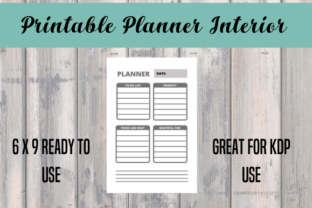
Launching a low-content book on Amazon requires more than just uploading a PDF; it demands a meticulous approach to technical specifications and user experience. When creators search for a KDP Planner Interior Print Ready to Use, they are typically looking for a shortcut to publication. The specific configuration of a 120-page, 6x9 inch planner with no bleed is one of the most popular formats in the industry because it balances portability with functionality while minimizing printing costs. However, the phrase "print ready" is often misunderstood or misapplied by both template sellers and new publishers.
True print readiness goes beyond having the correct page count and trim size. It encompasses margin safety, paper opacity considerations, binding allowances, and the actual usability of the layout for the end customer. Many aspiring publishers download a file labeled as ready-to-use, only to face rejection during the KDP review process or receive negative reviews due to poor design choices that were overlooked in the rush to publish. Understanding the nuances of this specific format is essential for creating a product that sells and satisfies customers rather than one that merely exists in the catalog.
The Margin Misconception in No-Bleed Designs
The most frequent technical error occurs when creators confuse "no bleed" with "edge-to-edge printing." In a 6x9 no-bleed interior, all content must be contained within a safe zone. A common mistake is utilizing a template where the lines, headers, or decorative elements extend too close to the trim edge. While KDP’s automated previewer might technically pass a file with 0.25-inch margins, this does not mean the physical book will look professional.
Printing machinery has slight variances, and a margin that is technically compliant but visually tight can result in text appearing dangerously close to the cut line. For a 6x9 planner, a safer outside margin is at least 0.375 inches, with 0.5 inches being ideal for a premium feel. Furthermore, many downloadable interiors fail to account for the gutter—the inner margin where the book binds. A 120-page book has a spine width of approximately 0.27 inches. If your downloaded interior has uniform margins on both sides, the writing space near the binding will be cramped and frustrating to use.
Correcting Gutter and Binding Issues
To avoid usability complaints, always verify that the interior you select has mirrored margins or an adjusted gutter. The inside margin should be significantly wider than the outside margin to accommodate the curve of the pages. Before finalizing any KDP Planner Interior Ready To Use 120 Pages 6 x 9 No bleed file, open it in a PDF viewer and measure the distance from the center fold to the first writable line. If that space feels restrictive on screen, it will be unusable in print. Adjusting the master slide or template settings before generating the final PDF saves costly reprints and protects your author reputation.
Paper Opacity and Ink Saturation Challenges
A critical oversight involves assuming that digital brightness translates to print clarity. KDP uses standard 55# (90 GSM) white paper for most trade paperbacks. This paper is relatively thin compared to premium stationery. A significant number of "print ready" interiors feature dark backgrounds, heavy grayscale shading, or solid black header blocks. While these designs look sleek on a backlit monitor, they often cause show-through on standard book paper.
When ink saturation is too high on one side of a 55# sheet, users cannot write on the reverse side without their pen marks bleeding through or the printed graphics showing underneath. This effectively halves the usable page count of your planner. A 120-page planner with heavy graphics becomes a 60-page planner in practice. To maintain high utility, prioritize line art, light gray tones (above 80% brightness), and ample white space. If you are evaluating a pre-made interior, print a test page on standard copy paper at home. If you can see the design clearly through the sheet, it is likely too dark for KDP production.
Functional Usability vs. Generic Templates
Beyond technical specs, there is a strategic risk in using generic interiors without customization. The market is saturated with identical 6x9 planners because many sellers use the same free or low-cost stock files. When a customer opens a "Look Inside" preview and sees the exact same dated weekly spread or undated dot grid found in fifty other books, perceived value drops immediately. More importantly, generic templates often lack logical flow.
Many mass-produced interiors include filler pages that serve no purpose, such as excessive "This Book Belongs To" pages, redundant yearly overviews, or poorly structured habit trackers. These elements consume valuable page real estate. In a 120-page format, every page counts. Wasting the first ten pages on non-functional content reduces the planner's lifespan and frustrates users who expect maximum utility for their purchase price.
Optimizing Page Count for Value
Instead of accepting a default layout, audit the interior for relevance. Does the target audience actually need three different monthly reflection spreads, or would they prefer more daily planning space? A better approach is to modify the base template to fit a specific niche. Adding specialized prompts, project tracking sections, or customized headers transforms a generic commodity into a targeted tool. Even small changes, like adjusting the time-blocking intervals or adding a notes section to weekly spreads, differentiate your product and justify a higher price point.
File Integrity and Metadata Verification
Technical rejection often stems from invisible file errors rather than visible design flaws. When sourcing a KDP Planner Interior Print Ready to Use, ensure the file is truly flattened. Editable PDFs with active form fields, layers, or embedded fonts that are not properly licensed can trigger KDP’s quality checks. Some template providers sell files that are technically editable Canva links or Word documents disguised as print-ready PDFs. Uploading these directly leads to formatting shifts, font substitutions, and blurry rendering.
Always export a fresh, high-resolution PDF (300 DPI minimum) from your design software after making any adjustments. Verify the final page size matches exactly 6x9 inches. A common discrepancy occurs when templates include crop marks or bleed guides in a no-bleed file, resulting in a trim size of 6.125 x 9.25 inches. KDP will reject this mismatch instantly. Use the KDP Previewer tool not just to check for errors, but to simulate the physical reading experience. Flip through the entire digital proof to ensure headers are consistent, page numbers are sequential, and no stray artifacts appear outside the safe zone.
Making Informed Sourcing Decisions
Selecting the right interior is a balance of efficiency and quality control. While pre-made templates save time, they require due diligence. Before purchasing or downloading any resource, check the provider’s specifications regarding commercial licensing and update frequency. Outdated templates may reference old KDP guidelines that have since been tightened. Read user feedback specifically mentioning print quality and margin issues, as these are indicators of real-world performance versus marketing claims.
Ultimately, treat any pre-made interior as a foundation rather than a finished product. The most successful publishers use these resources to accelerate their workflow while applying their own quality standards and unique branding. By verifying margins, respecting paper limitations, ensuring functional density, and validating file integrity, you transform a generic template into a professional-grade planner. This attention to detail builds trust with customers and establishes a sustainable publishing business based on quality rather than volume alone.